Powering Semantic Search with Qdrant in RAG Systems
Imagine a company handling thousands of resumes. Now imagine trying to search for the right information using only exact keywords. Traditional search systems often fail because they mainly rely on keyword matching instead of understanding meaning.
This is where vector databases shine with semantic search.
People with cooking experience
But a resume may contain:
- Chef
- Baking
- Food Preparation
- Recipe Management
Even though the resume is clearly related to cooking, a traditional search system may fail because the exact word:
cooking
is not present.
Similarly, a recruiter searching for:
People experienced in cybersecurity
may miss resumes containing:
- Penetration Testing
- Ethical Hacking
- Vulnerability Assessment
because traditional systems mainly rely on exact keyword matching instead of semantic meaning.
Modern AI systems solve this problem using:
- Semantic Search
- Embeddings
- Vector Databases
- Retrieval-Augmented Generation (RAG)
One of the most powerful tools enabling this workflow is Qdrant.
In this blog, we’ll understand:
- How RAG systems work
- How embeddings are generated
- How Qdrant performs semantic retrieval
- Similarity search and HNSW indexing
- How we used Qdrant in our projects
⚠️ Why Traditional Search Fails?
Traditional databases mainly rely on exact keyword matching. For example, assume we have a resume database.
Query:
People experienced in cybersecurity
Resume contains:
- Penetration Testing
- Ethical Hacking
- Vulnerability Assessment
Even though the resume is clearly related to cybersecurity, a traditional search engine may fail because it mainly relies on exact keyword matching.
This is where semantic search becomes powerful.
🚀 What is Qdrant?
Qdrant is an open-source vector database built specifically for:
- semantic search
- similarity search
- AI retrieval systems
Unlike traditional relational databases, Qdrant stores vector embeddings instead of simple rows and columns.
This allows AI systems to search based on:
- meaning
- context
- similarity
instead of exact keywords.
🔍 How Qdrant Finds Similar Results?
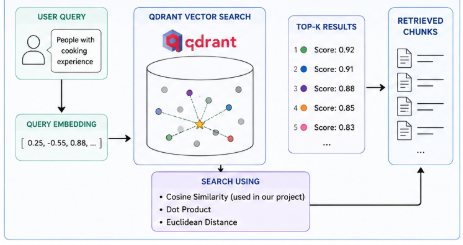
Qdrant performs similarity search using vector distance metrics.
When a query is converted into embeddings, Qdrant compares the query vector with stored vectors and retrieves the most similar results.
Common similarity methods include:
- Cosine Similarity
- Dot Product
- Euclidean Distance
In our project, we used:
Cosine Similarity
because it works well for semantic text embeddings.
⚡ HNSW Indexing in Qdrant
Qdrant uses an indexing algorithm called HNSW (Hierarchical Navigable Small World).
HNSW helps perform very fast nearest-neighbor search even when millions of vectors are stored.
Instead of comparing every vector one by one, HNSW creates connections between similar vectors and efficiently navigates through them during retrieval.
This significantly improves:
- search speed
- scalability
- retrieval performance
🤖 What is RAG?
RAG stands for Retrieval-Augmented Generation.
It combines:
- Retrieval from external knowledge sources
- Generation using Large Language Models (LLMs)
Instead of relying only on the LLM’s internal knowledge, a RAG system first retrieves relevant information from documents and then provides that context to the LLM.
This makes responses:
- more accurate
- more context-aware
- more reliable
💡 Why Vector Databases are Important?
Large Language Models alone cannot efficiently search through thousands of documents in real time.
Vector databases help perform fast semantic retrieval by comparing embeddings instead of exact keywords.
This makes systems like RAG scalable and context-aware.
Before storing documents in Qdrant, the uploaded text needs to be processed properly. This is where concepts like chunking, overlap, and embeddings become important.
📥 Document Ingestion and Indexing Pipeline

Before the actual RAG process begins, documents must first be processed and stored properly.
This stage is responsible for:
- document preprocessing
- embedding generation
- vector storage
- indexing
These steps prepare the knowledge base for retrieval.
📂 Step 1: Upload Documents
Users upload:
- resumes
- PDFs
- reports
- technical documents
into the system.
✂️ Step 2: Text Extraction and Chunking
The uploaded document text is extracted and split into smaller sections called chunks.
Example:
Chunk Size = 512
Chunk Overlap = 100
Chunking is important because large documents cannot be processed efficiently as one huge block.
Overlap helps preserve context between chunks.
Without overlap, important information may get split and lost.
🧠 Step 3: Generate Embeddings
Each chunk is converted into embeddings.
Embeddings are numerical vector representations of text.
Example:
[0.23, -0.56, 0.89, ...]
Texts with similar meanings generate embeddings that are close to each other in vector space.
📐 Vector Dimensions
The vector dimension depends on the embedding model used.
Examples:
MiniLM → 384 dimensions
MPNet → 768 dimensions
Smaller dimensions:
- faster retrieval
- lower storage
Larger dimensions:
- richer semantic understanding
- higher computation
🗂️ Step 4: Store Embeddings in Qdrant
The generated embeddings are stored inside Qdrant.
Along with embeddings, metadata like:
- file_id
- file_name
- chunk_size
- vector_dimension
can also be stored.
This helps in:
- semantic retrieval
- filtering
- file-specific retrieval
- faster search
🤖 RAG Retrieval Pipeline
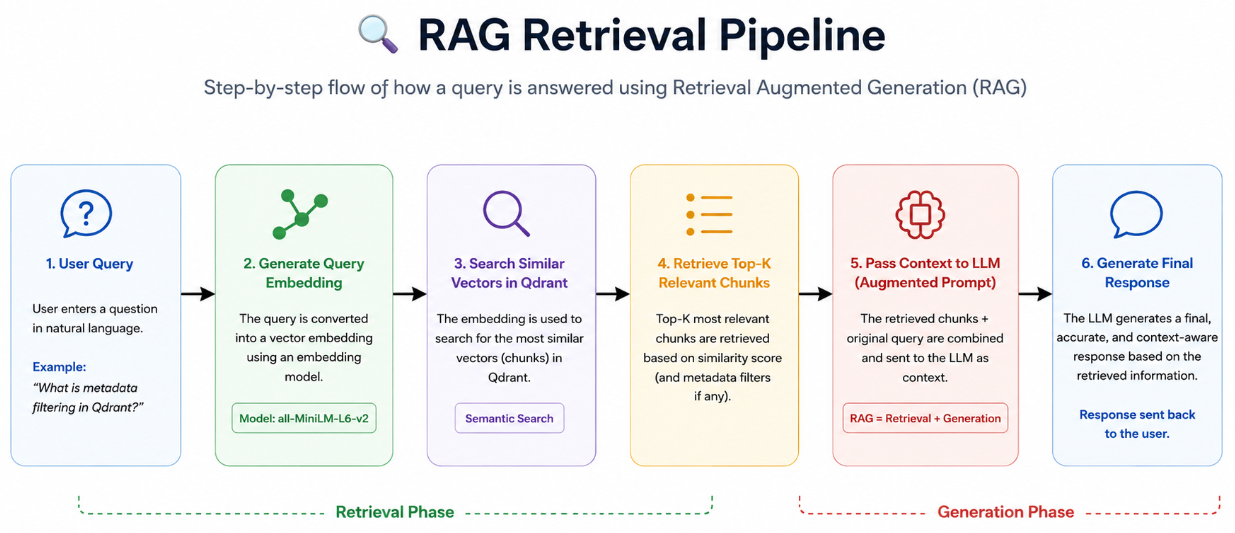
The actual RAG (Retrieval-Augmented Generation) process starts when the user enters a query.
RAG mainly consists of:
- Retrieval
- Augmented Context
- Response Generation
🔍 Step 1: User Query and Retrieval
When a user enters a query, the query is also converted into embeddings.
Qdrant compares:
- query embeddings with
- stored document embeddings
and retrieves the most semantically similar chunks.
During retrieval, Qdrant returns the top-k most relevant chunks based on semantic similarity.
Example:
Top 5 Results
Top 10 Results
🤖 Step 2: Augmented Generation
The retrieved chunks are passed to the LLM as additional context.
The LLM then generates the final response using:
- user query
- retrieved context
- semantic information
This process is called:
Retrieval-Augmented Generation (RAG)
because retrieval is combined with LLM-based response generation.
✅ Advantages of Qdrant
-
HNSW Support Qdrant provides highly optimized HNSW indexing for fast similarity search.
-
Metadata Filtering Supports payload filtering such as:
file_id
for targeted retrieval.
-
Hybrid Search Support Qdrant supports both dense and sparse vectors, enabling hybrid retrieval systems.
-
Lightweight Deployment Qdrant is lightweight and easier to configure compared to large distributed systems.
-
FastAPI and Python Integration It integrates easily with Python-based AI applications and FastAPI backends.
-
Open Source and Developer Friendly Qdrant is open-source with strong documentation and community support.
💡 Why We Chose Qdrant?
There are many vector databases available today:
- Milvus
- Pinecone
- Weaviate
- FAISS
- ChromaDB
One of the most useful features of Qdrant is metadata filtering.
In our RAG QA Generator project, we used:
file_id filtering
This allowed retrieval only from a specific uploaded document instead of searching globally across all files.
Example:
AI RAG → Global Retrieval

RAG QA → File-Specific Retrieval
This improved:
- retrieval precision
- context relevance
- targeted QA generation
🎯 Conclusion
Qdrant plays a major role in modern AI retrieval systems by enabling fast and efficient semantic similarity search.
Unlike traditional keyword-based systems, Qdrant understands semantic meaning through embeddings and retrieves context-aware information.
When combined with RAG pipelines and LLMs, Qdrant enables intelligent systems capable of:
- semantic document search
- document retrieval
- AI assistants
- question answering
- technical QA generation
As AI applications continue to grow, vector databases like Qdrant will become increasingly important for building scalable and intelligent retrieval systems.
📚 References
-
Qdrant Documentation (2026). Available at: https://qdrant.tech/documentation/
-
Qdrant Articles and Tutorials (2026). Available at: https://qdrant.tech/articles/
-
Sentence Transformers Documentation (2026). Available at: https://www.sbert.net/